



Buy AWS through CirrusHQ

Get more from every pound you spend on AWS

Many organisations buy AWS directly from Amazon, which means paying list price, often on a company credit card, and looking after the billing, the support cases and the commitment planning themselves. When you buy AWS through CirrusHQ instead, it costs you nothing extra, and you get a proper monthly invoice in pounds, Acuity to show you where the money goes, and AWS engineers who help you spend less.

CirrusHQ invoiceAWS usage for October 2026
Example
AWS usage by account
  • ProductionAccount 1 of 4
    £2,640.15
  • StagingAccount 2 of 4
    £812.30
  • Data platformAccount 3 of 4
    £598.75
  • Shared servicesAccount 4 of 4
    £167.20
  • AcuityEssentials, every account
    £0.00
  • CirrusHQ support desk
    Included
Total in GBP£4,218.40

Illustrative figures before VAT. The breakdown by tag is available whenever you need it.

AWS Premier Tier Services PartnerAWS Solution ProviderBacked by AWS SupportAWS Managed Service Provider
Why move your AWS billing to us

Lower AWS costs, clearer bills and expert help

CirrusHQ is an AWS Solution Provider, which allows us to sell AWS to you directly. You keep your own AWS accounts and full control of them, and everything we add is designed to help you understand, manage and reduce what you spend.

An invoice in place of a credit card

If your AWS bill goes on a company credit card today, it will arrive as a monthly invoice in pounds instead, so your finance team can pay it through their normal process and has a UK supplier to call with any questions.
Access to AWS discounts

We can offer discounts on AWS services, depending on what you use today and what you plan to use, and we look at your Savings Plans and Reserved Instances to make sure you are getting full value from them.

AWS incentives, credits and funded work

As an AWS Premier Tier Services Partner we can help you access the incentives, credits and AWS-funded consultancy you qualify for, and any credits AWS gives for your accounts or projects are passed straight on to you.

Costs broken down your way

Your invoice shows the spend for each AWS account, and if you need it we can break it down by your own cost allocation tags as well, so every team, project or cost centre can see its share of the bill.

Acuity included at no cost

Acuity, the AWS cost and operations platform we built and run ourselves, is included with every account we bill, so you can follow your spend through the month and act on it before the invoice arrives.

A support desk run by AWS engineers

Your team can bring technical and billing questions to our certified AWS engineers, who work the issue with you and take it to AWS when it needs AWS, through the Backed by AWS Support programme.

See where the money goes

Watch your AWS spend as it happens

Acuity reads the AWS cost and usage data for every account you bring to us and shows it in dashboards that your finance team and your engineers can both use, which means a rise in spend is something you can spot and deal with in the middle of the month.

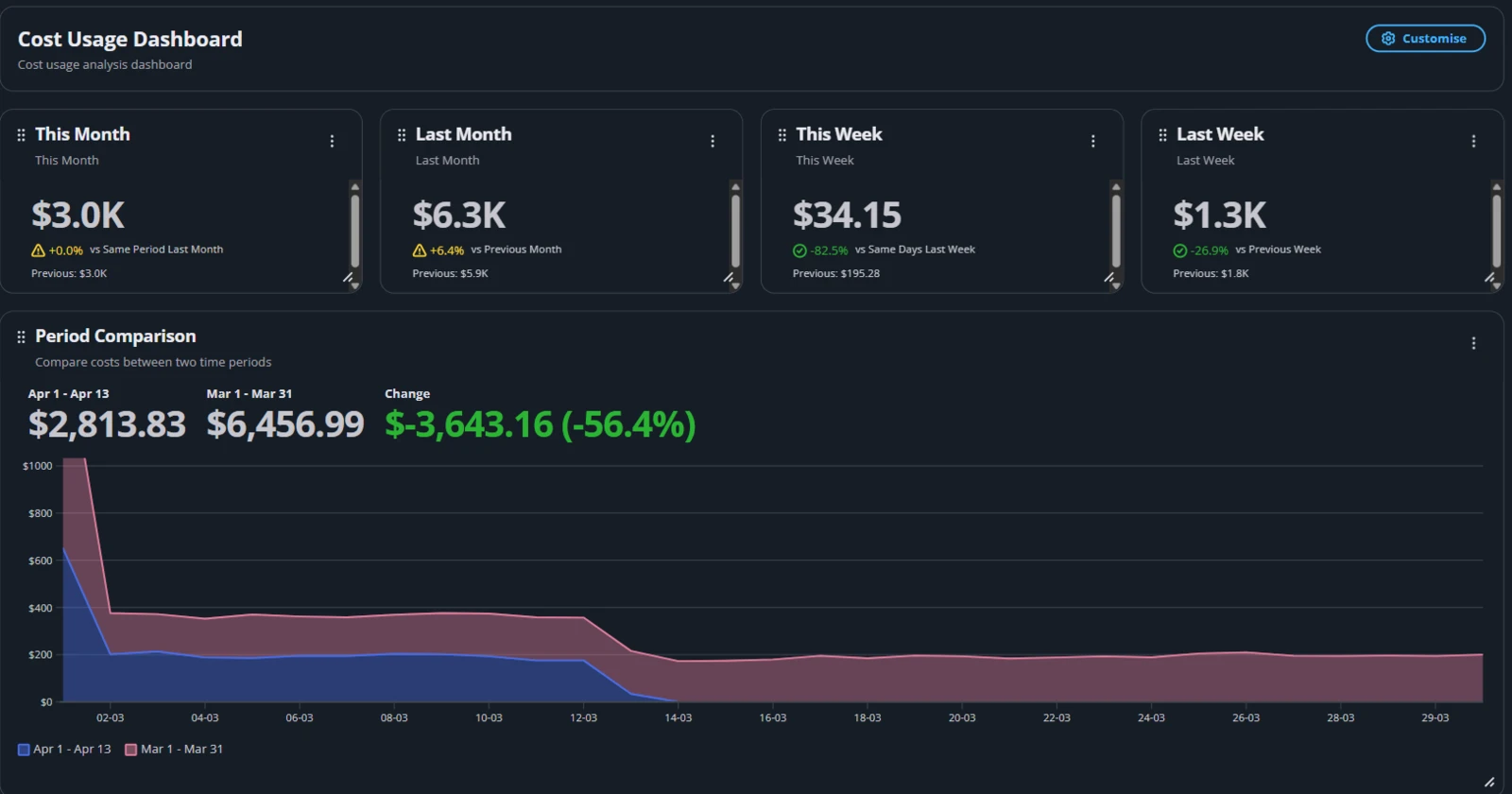
The Acuity cost usage dashboard showing spend for this month, last month, this week and last week, and a chart comparing two periods
Compare any two periodsSee this month against last month, or this week against last week, and find out exactly how much your spend has moved and on which days it changed.
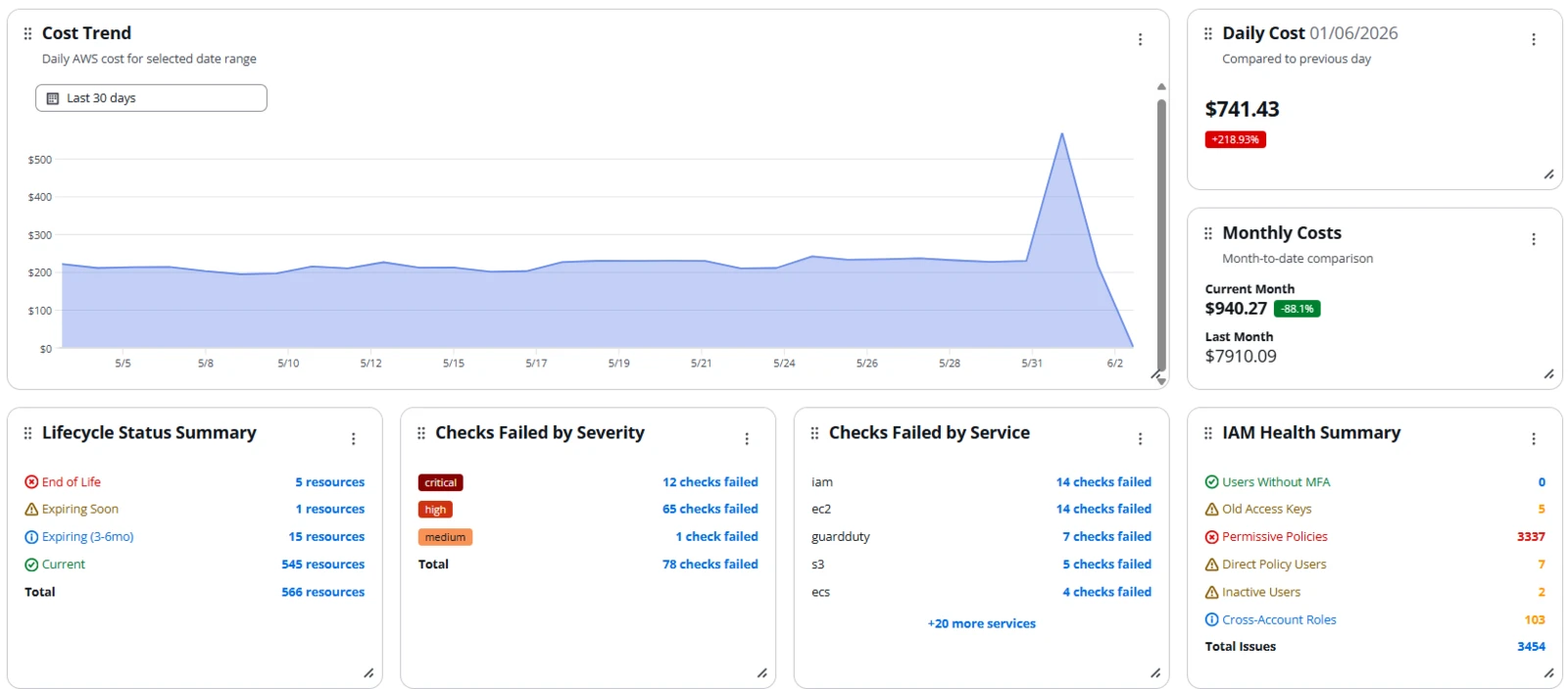
The Acuity dashboard showing the daily cost trend with a spike, month-to-date costs, lifecycle status, failed checks by severity and service, and IAM health
Catch a spike the day it startsThe daily cost trend shows an unexpected jump as soon as it happens, alongside the operational health of your accounts, so the cause can be found and fixed before it costs you much.

Screenshots from Acuity using sample data.

Choose your plan

Three plans, all built on billing and support

Every plan includes your monthly invoice in pounds and our support desk. The plans differ in how much of Acuity you use to control cost and to keep your accounts healthy, and you can choose a different plan for each account, so production can sit on a higher plan while sandboxes stay on Essentials.

Essentials

No extra cost

Billing, support and the Acuity cost analytics you need to see and understand your AWS spend.

Billing and support

  • Monthly invoice in pounds, broken down by account, or by tag if you need it
  • Access to AWS discounts, incentives and credits
  • Support desk run by CirrusHQ engineers, backed by AWS

Acuity cost

  • Cost analytics you can drill into and export

Acuity operations

  • Notification channels and rules for alerts
  • Unlimited connected AWS accounts
  • Team access control with multi-factor sign-in
Talk to us
For production

Advanced

Priced per account

Everything in Standard, with deeper operational and compliance coverage for the accounts that run your business.

Billing and support

  • Everything in Essentials

Acuity cost

  • Everything in Standard

Acuity operations

  • Everything in Standard, plus
  • Patch compliance tracking
  • Software inventory across your instances
  • Systems Manager session history
  • Advanced compliance reporting
Get a price

Larger estates of more than 25 accounts can move to one price across every account, with custom terms and a named contact at CirrusHQ. Acuity Intelligence, which lets your team ask questions about your AWS accounts in plain English, can be added to any plan.

You can read more about each Acuity feature on the Acuity website.

Two ways to start

Moving to CirrusHQ is free, whether you are new to AWS or already on it

Both routes lead to the same place, with your own AWS accounts billed by us in pounds and your chosen plan switched on, and we do the work of getting you there.

New to AWS

Start on AWS through CirrusHQ

  1. Tell us what you are planningLet us know the workloads you want to run, how many accounts you expect to need and roughly what you expect to spend each month.
  2. We set up your accounts and billingYour AWS accounts belong to you from the first day and are billed through CirrusHQ, and if you would like a secure multi-account landing zone built properly from the start, our engineers can build that for you as well.
  3. Your plan is switched onAcuity is connected to every account and your team can bring questions to our support desk straight away.
  4. You pay CirrusHQ monthly in poundsEach month you receive one invoice in GBP that covers all of your accounts.
Already on AWS

Move your existing AWS billing to us

  1. Send us a recent AWS invoiceAn invoice or your typical monthly spend is all we need to show you what AWS would cost through CirrusHQ.
  2. We review what you already haveWe look at your accounts, your support plan, your Savings Plans and Reserved Instances and any AWS credits, so that nothing of value is lost in the move.
  3. You approve the billing transferAWS billing transfer changes who pays AWS for your usage, and your accounts, workloads and root access all stay with you.
  4. Your plan starts and your invoices changeWe connect Acuity to your accounts and from then on you receive one monthly invoice from us in pounds.
Why buy AWS from CirrusHQ

An AWS Premier Tier Services Partner helping organisations onto AWS since 2011

200+AWS customer launches
100+AWS certifications, with every engineer certified
+93Net Promoter Score from our customers
ISO 27001Certified to ISO/IEC 27001:2022

Buying AWS through CirrusHQ

Will it cost more than buying direct from AWS?

No. Send us a recent AWS invoice and we can show you the numbers side by side. Discounts on AWS services depend on what you use and what you need.

Do we keep our own AWS accounts?

Yes. Your accounts, workloads and root access remain yours throughout, and we add only the access roles that Acuity and our support engineers need in order to help you.

Which currency are the invoices in?

Every invoice is in pounds sterling and covers your AWS usage across all of the accounts you bring to us, broken down by account, or by your own cost allocation tags if you ask us to.

Can we use different plans for different accounts?

Yes. Each account can be on its own plan, so a common approach is to put production accounts on Advanced and keep development and sandbox accounts on Essentials or Standard.

What happens to our AWS credits and Savings Plans?

We review them with you before the move. Credits AWS gives for your accounts or your projects are passed on to you, either as a discount on your bill or as funded work, depending on what they were given for.

Can public sector organisations buy AWS this way?

Yes. Our G-Cloud 15 FinOps listing covers AWS resale, and we are happy to talk through the best route for your organisation.

How do we stop buying AWS through CirrusHQ?

You give notice under your agreement with us and the billing transfer is cancelled, after which AWS bills you directly again and your accounts carry on exactly as they were.

Get a price for your AWS spend

Send us a recent AWS invoice or tell us what you spend each month, and we will show you what the same usage would cost through CirrusHQ and which plan would suit you best.